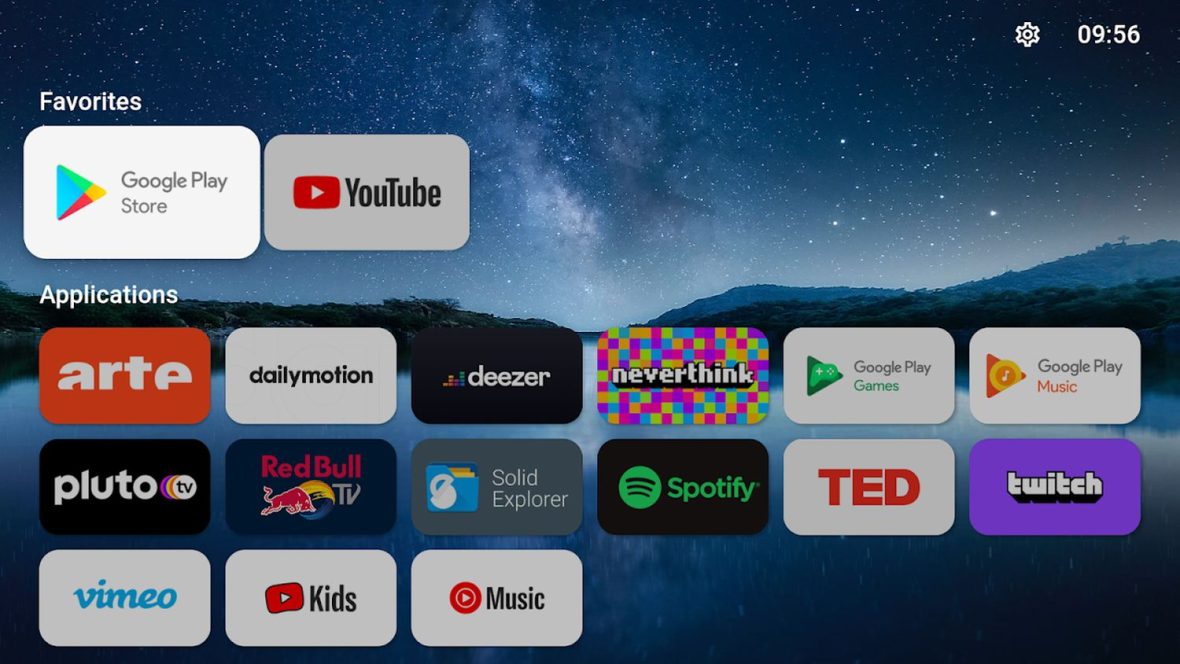
Alright 👌 if youre tired of the default Android TV or Google TV home screen, youre not alone.
Lets be honest…
- Too many ads
- Too many recommendations you dont care about
- Apps buried under rows of content
- Sluggish navigation
In 2026, more users than ever are switching to custom launchers to clean up their TV experience.
In this guide well break down the best Android TV / Google TV launchers in 2026, explain what they do how to install them, and which one might be perfect for you.
No complicated tech talk just real helpful info 👇
How to Stream on Smart TV (2026)
What Is a TV Launcher?
A launcher is basically your devices home screen.
It controls:
- App layout
- Background design
- Navigation style
- Widgets
- Shortcuts
- Recommendations
When you install a new launcher youre replacing the default home screen with something cleaner, faster, and more customizable.
Think of it like changing the face of your TV.
Why Change Your Android TV / Google TV Launcher?
Heres why people are doing it in 2026:
✅ Remove ads from home screen
✅ Make it minimalist
✅ Faster performance
✅ Organize apps better
✅ Hide unused apps
✅ Custom background
✅ More privacy
Especially on Google TV, many users want something less content pushed and more app focused.
Is It Safe to Install a Custom Launcher?
Yes as long as you install from trusted sources like:
- Google Play Store
- Official developer websites
Youre not hacking anything.
Youre just customizing your own device.
Best Android TV / Google TV Launchers in 2026
Lets get to the good stuff 🔥
1️⃣ Projectivy Launcher
If youve spent any time in Android TV communities youve probably heard about Projectivy.
Why its popular:
- Clean interface
- No ads
- Highly customizable
- Lightweight
- Free
What makes it great:
You can fully control:
- App rows
- Categories
- Background image
- Icon size
- Layout style
It feels modern and fast.
Perfect for users who want total control.
Best for:
People who hate ads and want a clean setup.
2️⃣ FLauncher
If you love minimalism, this ones for you.
FLauncher is:
- Open source
- Extremely lightweight
- Privacy focused
- Very simple
No recommendations.
No content feeds.
Just apps.
Thats it.
Its perfect if you want your TV to feel like a clean dashboard.
Best for:
Minimalist users.
3️⃣ ATV Launcher Pro
This one has been around for years and is still strong in 2026.
Features:
- Custom widgets
- Custom tiles
- Category organization
- Weather widgets
- Custom backgrounds
It feels more like a customizable tablet home screen adapted for TV.
Its not free (Pro version) but worth it for advanced users.
Best for:
People who love deep customization.
4️⃣ Wolf Launcher
Very popular among Firestick and Android TV users.
Why people like it:
- Super lightweight
- No ads
- Custom sections
- Clean look
Many IPTV users prefer it because it keeps things simple and fast.
Best for:
Streaming focused setups.
5️⃣ HALauncher
If you want to see ALL apps even hidden or sideloaded ones this launcher helps.
Its useful for:
- Developer testing
- Sideloaded apps
- Accessing hidden apps
Its not the prettiest, but its functional.
Best for:
Advanced users and testers.
Which Launcher Is Best for You?
Heres a quick breakdown:
| If You Want… | Choose |
|---|---|
| Clean & Ad-Free | Projectivy |
| Minimal & Fast | FLauncher |
| Advanced Customization | ATV Launcher Pro |
| Streaming Setup | Wolf Launcher |
| Developer Access | HALauncher |
How to Install a Launcher on Android TV / Google TV
Installation is simple.
Step 1: Open Google Play Store
Search for the launcher name.
Step 2: Install
Click Install.
Step 3: Open Launcher
Launch it once.
Important: Setting It as Default
Heres where things get interesting.
On Android TV:
You can often set the launcher as default through settings.
On Google TV:
Google makes it harder.
Sometimes you need:
- Button remapper apps
- ADB commands
- Third party tools
This depends on device brand and software version.
Some devices allow easier switching than others.
Does a Custom Launcher Improve Performance?
Short answer: Often yes.
Why?
Because:
- Less background content
- Fewer recommendations
- No heavy ad banners
- Cleaner UI
Especially on lower end Android TV boxes, a lightweight launcher can feel noticeably faster.
Can You Go Back to Default?
Yes.
You can always:
- Uninstall the custom launcher
- Disable it
- Reset app defaults
Youre not permanently changing your system.
Best Launcher for IPTV Users
If your main goal is IPTV streaming:
Projectivy and Wolf Launcher are usually top picks.
Why?
Because they:
- Focus on apps
- Keep layout clean
- Load faster
- Reduce clutter
Perfect for setups with IPTV Smarters, TiviMate, Kodi, and streaming apps.
Privacy Considerations
Default Google TV launcher collects viewing preferences for recommendations.
Custom launchers:
- Reduce tracking
- Limit recommendation feeds
- Give you more control
If privacy matters to you thats a big plus.
Downsides of Custom Launchers
Lets keep it real.
Possible downsides:
- Google updates may break compatibility
- Extra setup steps required
- Some features like voice search may not fully integrate
- Default launcher may still run in background
Its not perfect but manageable.
Advanced Customization Tips
If you want next level setup:
- Add custom wallpapers
- Create IPTV only homepage
- Group apps by category
- Add weather widgets
- Use icon packs
Your TV can look completely different in 10 minutes.
Android TV vs Google TV – Does It Matter?
Yes.
Android TV is more flexible.
Google TV pushes content recommendations harder.
Custom launchers are especially popular among Google TV users who want less content clutter.
2026 Trend: Minimalist Streaming Setups
The big trend in 2026?
Simple home screens.
Users are moving away from:
- Busy layouts
- Auto playing previews
- Content overload
And moving toward:
- Clean dashboards
- App first design
- Fast navigation
Custom launchers fit this trend perfectly.
Final Thoughts
Changing your Android TV or Google TV launcher in 2026 is one of the easiest ways to upgrade your streaming experience.
Whether you want:
- No ads
- Faster navigation
- Clean design
- IPTV focused layout
- More privacy
Theres a launcher for you.
If youre a beginner, start with Projectivy.
If you love minimalism, try FLauncher.
If you want full control go with ATV Launcher Pro.
It only takes a few minutes and it completely changes how your TV feels.
Clean.
Fast.
Simple.
Custom.
Thats the 2026 streaming vibe 🔥
